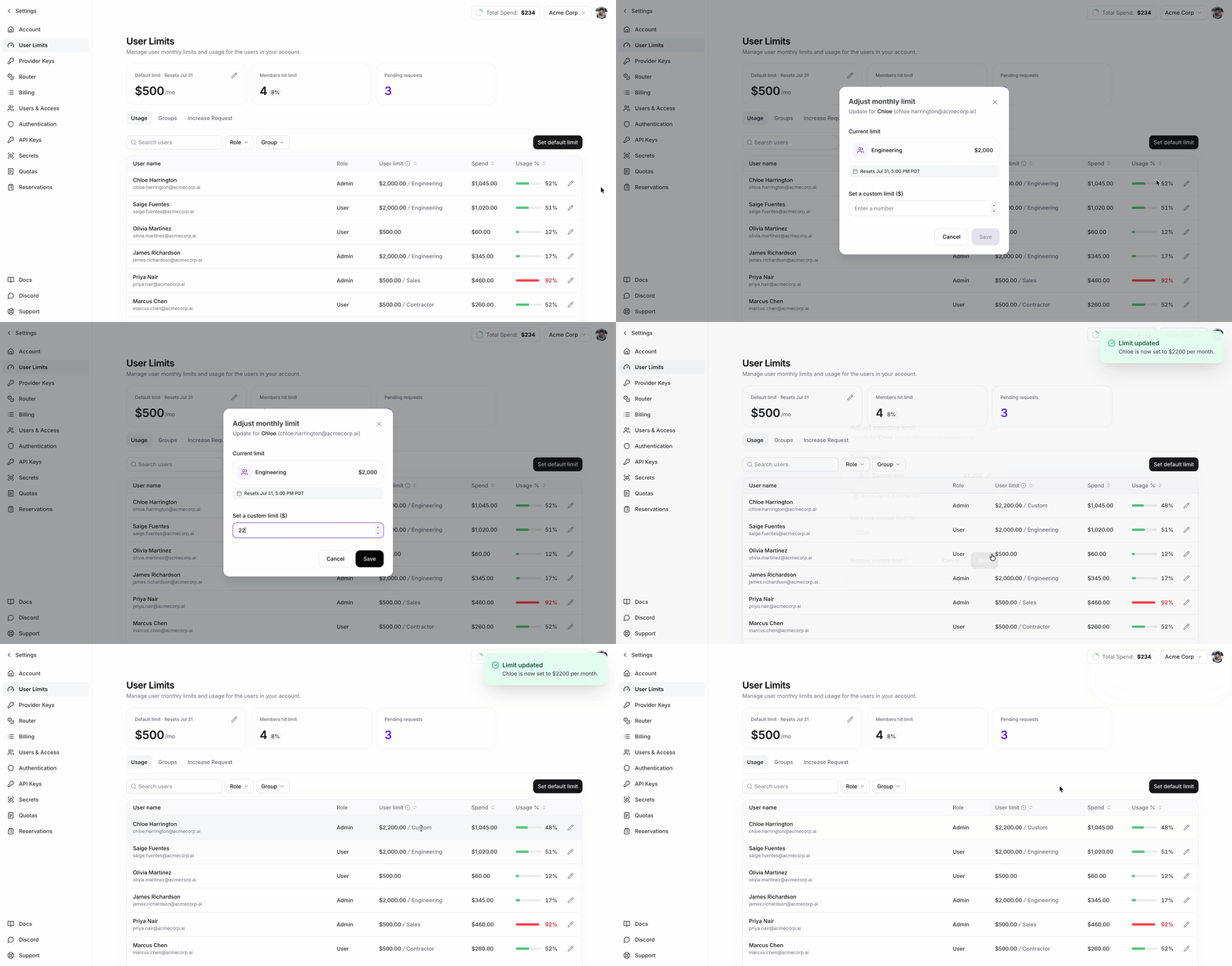
Set spending limits for individual users in your account on serverless (per-token) inference. Nexus accounts start with a $100 per-user default limit. You can change the account-wide default cap and override it for specific users. When a user reaches their limit, their further serverless requests are blocked until the billing period resets.
Per-user usage limits are available on request. Reach out to your Fireworks contact to enable them for your account.

Concepts

  • Account default cap — the per-user spending limit applied to every user who doesn’t have their own override. Nexus accounts start with a $100 default.
  • Per-user override — a specific user’s own cap. Takes precedence over the account default.
  • Effective limit — the limit actually applied to a user: their override if set, otherwise the account default.
  • Current-period usage — how much a user (and the account overall) has spent in the current billing period.
All amounts are in USD, and usage resets at the start of each billing period.

Supported models

Per-user metering applies to all serverless models except MiniMax M2.7. Usage on MiniMax M2.7 does not count toward a user’s limit and won’t trigger blocking.

Who can do what

  • Account admins — view and manage everything: update the default cap, set/clear per-user overrides, and view every user’s usage.
  • Members (non-admin) — view the account-level limits and their own usage and limit. Members cannot view other users’ limits, list all users, or change any limits.
Each command below is annotated with who can run it.

In the web app

Account admins can view and update the default per-user cap and per-user overrides in the Usage limits page under Settings in the Fireworks web app. Members can view the account default and their own usage and limit there.

Using firectl

Account-level

The default cap applies to every user who doesn’t have their own override. New Nexus accounts start with a $100 default; change it in Settings → Usage limits or with firectl usage-limits update.

Per-user

A user record shows:
  • used — current-period spend
  • effective_limit — the limit applied to them (override, else account default)
  • override — their per-user override, if any
  • exceeded_until — set only when the user is currently blocked; shows when the block lifts (the end of the current billing period)

Per-user overrides

Set an override when a user needs a different cap than the account default. firectl usage-limits user unset removes the override and reverts that user to the account default. The account-wide default cannot be cleared — every user without an override uses it.

Using the REST API

Read

Update (admin only)

Updates use PATCH with a field mask indicating which fields to change:
  • PATCH /v1/accounts/<ACCOUNT_ID>/usageLimits — update default_user_limit (cannot be cleared)
  • PATCH /v1/accounts/<ACCOUNT_ID>/users/<USER_ID>/usageLimits — set limit_override (an unset value removes the override)
firectl, the web app, and the REST API below all support the same changes.

How enforcement works

  • A user who reaches their effective limit is blocked from further serverless requests until the billing period resets. Blocked requests receive HTTP 402.
  • Limits are per billing period. Usage and any blocks reset when the period rolls over.
  • Enforcement is near-real-time, not instantaneous. After a user crosses their limit there is a short delay (typically a few minutes) before requests start being blocked, and a similar delay before a user is unblocked after you raise their limit. Plan around this lag rather than expecting an immediate cutoff.
  • A $0 cap means the user is allowed no serverless spend — they are blocked immediately.
  • Only serverless (per-token) inference on supported models counts toward these limits. MiniMax M2.7 is excluded. Dedicated deployment (GPU-hour) usage is not metered per user here.

FAQ

Serverless per-token inference spend in the current billing period.
Their serverless requests return HTTP 402 until the billing period resets or their limit is raised.
Yes — a user can read their own usage and limit; they just can’t see other users’ limits or change any limits.
No. Usage and blocks reset each billing period.